Today I was able to demo some of the features of Windows Azure Mobile Services for the Global Windows Azure Bootcamp. We certainly had a great time.
Here is a video to recap some of the areas we covered:
Mobile Services Getting Started With Data
Today I was able to demo some of the features of Windows Azure Mobile Services for the Global Windows Azure Bootcamp. We certainly had a great time.
Here is a video to recap some of the areas we covered:
Mobile Services Getting Started With Data
Last week the Windows Azure team released a number of great enhancements to Windows Azure.
If you have been looking for a quick way to see how your MVC pages would render on an iPhone or iPad… I have some good news for you. This week while attending aspConf i saw Scott Hanselman run an MVC app directly from Visual Studio in what looked like an iPhone Simulator (link). Indeed it was, I googled and found a blog post that detailed how to do this. I will try to explain in detail for those interested.
Step 1: Download Microsoft WebMatrix 2.0 RC
You will need to download WebMatrix 2.0 RC in order to get the browser extensions to support this.

Step 2: After install, Open a site in WebMatrix

Step 3: Select a site and click Ok

Step 4: Select Add New from the Options in the Run Menu

Select Add New
Step 5: Select the iPhone simulator from the Browser extensions gallery. Either option (iPhone/iPad) will work as it is the same simulator.

Install iPhone (or iPad) Simulator
Step 6: Open Visual Studio with you Web Project. From the Debug control select Browse with

Select Browse with in Visual Studio
Step 7: Add a new Browser to the list

Select Add (new browser)
Step 8: in Program, look for Electric Plum’s Simulator
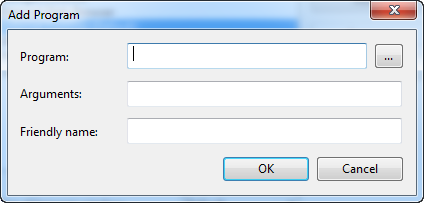
Browse for Electic Plum’s executable
Step 9: Navigate to this Directory:
C:\Users\USER\AppData\Local\Microsoft\WebMatrix
\Extensions\20RC\iPhoneSimulator\
ElectricMobileSim\ElectricMobileSim.exe

Browse for: ElectricMobileSim.exe
Step 10: Add arguments and Rename the Browser.
Argument “1”: iPhone Simulator
Argument “2”: iPad Simulator

Arguments: 1 – iPhone Simulator, 2 – iPad Simulator
Step 11:

Run the project with this new browser
Step 12: Enjoy!
You can now test out your web app on this iPhone or iPad simulator. While nothing compares to actual testing on a device this is a great option for .NET Developers who need a quick way to test directly from Visual Studio their work. This is great for testing the new MVC 4 Mobile templates too.
For non .NET Developers you may want to try out Adobe’s Shadow also; it is a Chorme extension that connects to physical devices too.
Update: David Neal from NashDotNet also mentioned that this is a great way to develop quick mockups when you need it as you can take screenshots from the simulator.
Update: ElectricPlum Studio is no longer free but the lite version comes bundled with WebMatrix now and still does all you need!
Today I had a little issue trying to create a new project from VS2010 to my just recently installed TFS 11 express :
 I confirmed in security manager that I had all access possible….
To fix it I installed Team Explorer for Microsoft Visual Studio 11 Beta from here

It installed the VS 2011 beta shell, from here Team Explorer works as expected and a new project can be created:
Once the new project was in place all expected task from VS2010 are available, like to create tasks, bugs, define builds, etc.
All expected items are available from the Web site:

Next post, where are all those fancy graphs? [maybe express version has only source control]
I had played with WOL (Wake-On-LAN) some years ago but now with the way tablets are spreading and being able to RDP from them to any computer this old school trick makes it too easy to turn your computer on from anywhere and be able to log into it remotely (for those little things that your mobile browser just can’t do yet).
I want o give a shout out to Mathew who’s post had me up and running in Win7 in less than 5 minutes.
PS: try the WOL Sniffer, it works like a charm.
I have been meaning to write this down but as always the muse has escaped my thoughts these past few days. I was inspired a while ago by a writer called Derek K. Miller; like a viral cat video his last tweet and his famous “last post” caught my eye. After reading them and googling the heck out of him and his story I asked myself if I would do such a thing when I died and the answer (which wouldn’t surprise those who know me) would be Absolutely YES!
Now the question would be… what would I write about. I believe my family and loved ones would take a huge chunk of space but I also would love to recall if possible anyone who ever touched my life in any way, from childhood to adulthood and so on. Now imagine if every person in the world had that same chance; to have the the knowledge that their time was near and being able to send a message from the other side. What would some of the ones that we lost too son would have said.
I think Derek as many other had done in the past made clear that death is not the end that we can keep tweeting and blogging from the other side. I think we should all start the habit of scheduling tweets and posts and along the way compose a journal of the whom and how that changed our lives. You might not be surprised by the message your grandmother or wife would leave you but wouldn’t it be nice if we could all tell that person who gave you a ride or shared a cab with you on a rainy day in a distant location of how that moment made you feel. I do think it would make some of our digital noise more pleasant. Now go and read his story and start writing yours.
On a world where image is all it is a breath of fresh air to see how companies like Facebook, Twitter and Foursquare are handling media response to their “down time”. As Oscar Wilde would say: “Experience is simply the name we give our mistakes.” and on an ever expanding internet world many face the same issues as the big guys on the block when scaling up and scaling out.
As seen on Mashable’s Post Mortem section no matter how strong our error handling frameworks are there is always room for improvement as seen on Facebook’s article on their “worst outage ever”. We are used to seeing the “FailWhale” but what most people don’t see is how Twitter is usually quick to post on their blog the what, and how the problems were solved. As many sites are moving to other dbms’ like MongoDB we learn a bit from FourSquare’s “re-indexing” problems.
I believe every developer team should have a Post Mortem Wiki or blog were new resources can learn from previous mistakes and a sense of collective knowledge can be shared by the whole team.
Have you implemented this idea in your daily life? Is this part of your Development team practices? Let me know.
I can’t believe I still go back to this app, but I just can’t argue with simplicity. Have you ever wanted to know which files or folder are the elephants in your hard drive? Well if this is your case try SpaceMonger. This nifty utility will show you in scale your files and folder according to size on drive.
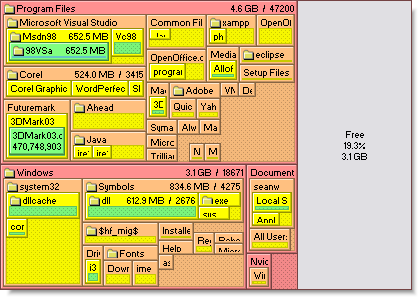
SpaceMonger Treemap
If you do find something better send me a comment and I’ll surely try it out.
Update: Thanks to @cyberllaco for letting me know that WhatSize has the same functionality for Mac users.


 Abe Diaz