Author Archives: Abe Diaz

How to Upgrade WordPress Automatically with GoDaddy Hosting

If you are like me you hate having to download the latest WordPress Install and FTP’ing it to your server to update it. A simple solution is to give your WordPress folder write permissions. Note: this is a security risk but done quickly at off hours it will save you some troubles. If you have your site hosted in GoDaddy launch the the Hosting Control Center and navigate to the File Manager. Now click on your WordPress folder (it might be root or different depending on your install). Click the Permissions icon at the top next.

Setting up folder permissions

Setting up folder permissions

After that you will see a small panel open up. Select the Write checkbox and click OK.
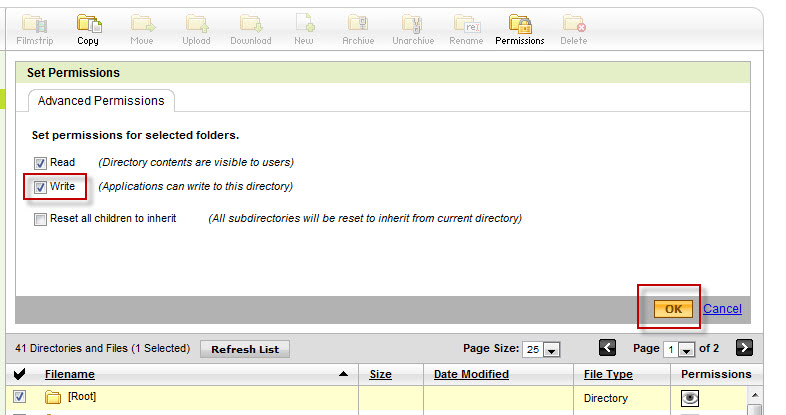
Applying write permissions

Applying write permissions

Now go to your WordPress dashboard and click on the Upgrade link; here click on the Upgrade Automatically button. You should see the install details with a successful confirmation on the page.

And there is nothing more to it. The same process can be applied to inner folders for themes, plugins and file uploads issues. This is one of the downsides of having a higher security setting on the shared servers.

Try it out and have fun 🙂

Note: Thanks to Kofla Olivieri for confirming the same process works for TypePad too.
Tagged

I’m in Plugin Hell

Doesn’t it suck when you get so used to a plugin that you assume it is part of the original product? To the point where you refuse to use other people’s system if they don’t have that plugin installed… yes I know!

Sadly when that same plugin decides to “Go Rogue” it really wipes the smile of your face. I had that happen using one of the most popular extensions for Visual Studio: Productivity Power Tools (free). For those of us using the Ultimate version of VS2010 Going to the Data Menu is a lost cause. Schema Compare and Data Compare both crash VS upon clicking.

For those in the same pickle…  I have found a hack to keep on working but it really doesn’t solve the issue.

Tagged ,

A brighter future for WordPress

I am glad to discover that on WP 3.0 WordPress and WordPress MU have merged. For all those running WP and holding off on using MU this are some cool news.

Also some new plugins open new doors to flexibility and adaptable code. HookPress is a plugin that offers webhooks, these can be used to develop Push notifications (very popular now due to some mobile devices) and more. It is still in a development phase but I believe it can lead to many more automated publishing schema.

When you need more than one Unique ID {NEWID(), NEWSEQUENTIALID()}

Reading up on SQL Server Central article (Randomizing Result Sets with NEWID) on how to implement real Random sets I considered writing about the importance of GUID‘s and their most common implementation.

We typically use integer numbers as primary keys in most of tables but when non persistent data (or session data) is manipulated using a GUID becomes a necessity. We do know there is a slight chance that a GUID could be repeated but it is so low the benefits of using it make this depreciable. commonly we use NEWID() as the default value on a uniqueidentifier column but the benefits in querying and overall readability make NEWSEQUENTIALID() a better suit in this case.

As an example imagine a web application that collects user data but does not store it in your tables until user creates a login or account. We can handle most of this information on a separate table and XML drafts and link the two with these unique GUIDs.

So go ahead and give them a try it will sure come in handy some day.

GoGoInFlight

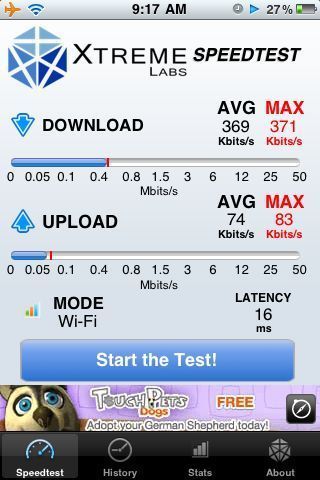
I am 20,000 feet in the air and still connected to the web via this service. Download speed around 360k and upload around 75k. Glad I also came prepared with my energizer battery pack for iPhones. Oh couple of years ago I only dreamed of this stuff. I’m glad we have come a long way.

WordPress iPhone App

I can’t believe I had not seen the “Genius” feature on the app store until now. But I did and I am glad because I just downloaded the WordPress app from it. I hope this little app performs as published and for it to be a new way to reconnect in my blogging days.

So if you can read this then… Success.

Visio Replacements (Web Based)

Today I needed to make a flowchart but had a computer with no Microsoft Visio on it, well what to do then? A quick search on Google landed me these two sites.

First one is Project Draw, a nice utility free but not so easy to use…

Next one is Gliffy, this one has a free trial for 30 days (just put an email and that’s it), it features an easier interface.

Try them both and see for yourself if these web based tools work for you. 😉

Twitter, iPhones, iPods and everything mobile.

I have to admit that i have moved myself from a blogging world to one in Twitter. I post in both English and Spanish and I have incredibly met a ton of friends that have become a part of my life (thanks to Tweet-ups). Therefore I thought that a little talk about moving blogs and content to these mobile platforms is crucial. From installing WPtouch in wordpress to make the site less loaded for mobile browsers to including tweetbacks and ways of spreading your readers comments to other sites.

Also as designers there has to be a stop to using heavy content on sites, Flash is ok in certain places but a whole site made on flash is sort of unproductive. Do you really want to cut all those users without flash from your site, besides with the many beautiful things that you can do with CSS why bother?

That is just a quick thought of mine… I’ll try not to fade away with all my work.

MySQL Workbench OSS

I’m currently in love with MySQL‘s Graphical DB designer MySQL Workbench, it makes the design process a lot aesier and it also produces models and diagrams. After all the design is done (including Foreign Keys and Views) you can just copy and paste into MySQL Query Browser and create the whole DB in just seconds.

Xobni

If you can’t tell it spells Inbox in reverse. Now that where all the similarities to what you are accustomed as an inbox end. It makes finding attachments really easy and you’ll waste a lot of time with all the stats it gives. For all you MS Outlook users, Check it out.

Tagged